Visualize a Workflow
note
Replace the placeholder prompt below with the version your team has validated. Add example output, tips, and any org-specific context.
Prompt
Generate a visual diagram of the following Temporal workflow.

[Paste your workflow code OR describe the process in plain language, e.g.:
"When an order is placed, reserve inventory, then charge payment. If payment succeeds,
create a shipment and send a confirmation email. If payment fails, release the inventory."]

Please produce:
1. A sequence diagram in Mermaid format showing the interactions between the Workflow,
   Activities, and external systems
2. A happy-path flowchart showing the step-by-step execution
3. An error-path flowchart showing what happens when each activity fails
4. Render the mermaid diagram and make it easy to read for a non-technical person to understand

Label each step with the activity name and note any retry or compensation behavior.
Example output
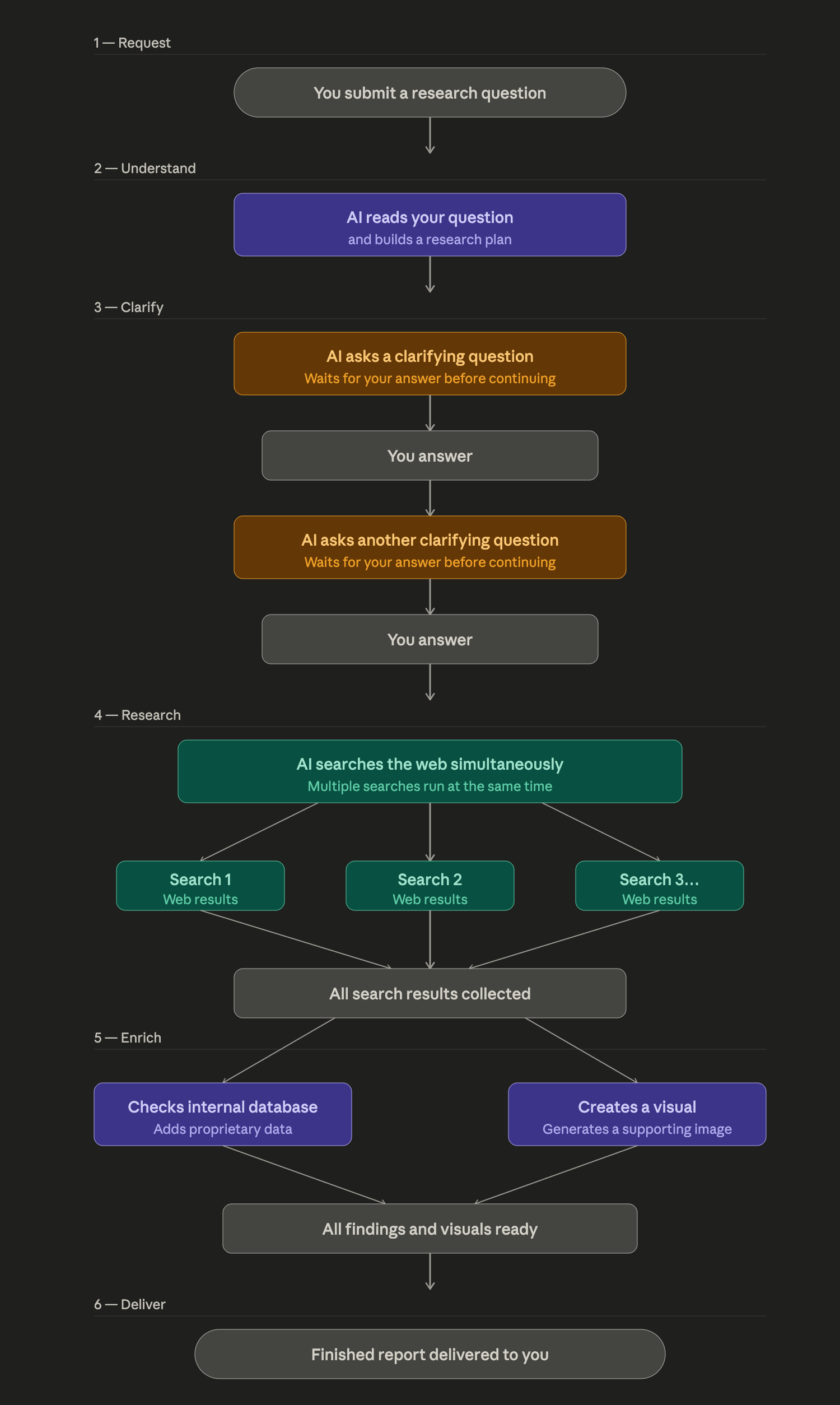
Here's a full breakdown of the workflow with a diagram.

---

## What This Is

This is a **durable, interactive deep-research system** built on Temporal. A single `InteractiveResearchWorkflow` orchestrates a multi-agent pipeline — an LLM (the Orchestrator) drives all decisions via tool calls, while Temporal provides the durability, state management, and human-in-the-loop primitives.

---

## Workflow Diagram

Render the following mermaid diagram:
flowchart TD
    A([User submits query via UI]) -->|start_research update| B[Workflow unblocks\nrecords original_query]

    B --> C[OrchestratorAgent\ngpt-5 · planning phase]

    C -->|tool: elicit_user #1\n+ commits progress_plan| D{wait_condition:\nawait user answer}
    D -->|submit_elicitation_response update| E[Answer 1 returned to agent]

    E -->|tool: elicit_user #2| F{wait_condition:\nawait user answer}
    F -->|submit_elicitation_response update| G[Answer 2 returned to agent]

    G -->|tool: run_parallel_research\n4–6 subqueries| H[Fan-out: ResearchWorkerAgents\ngpt-5-mini · web search]
    H --> H1[Worker 1\nWebSearch]
    H --> H2[Worker 2\nWebSearch]
    H --> H3[Worker N...\nWebSearch]
    H1 & H2 & H3 -->|SearchSummary objects| I[Results gathered]

    I -->|parallel tool calls| J[query_data_warehouse\nTemporal Activity\nwith retry policy]
    I -->|parallel tool calls| K[generate_research_image\nTemporal Activity\n180s timeout]

    J & K --> L[All evidence assembled]

    L -->|structured output:\nFinalizeReportRequest| M[Workflow calls complete_research\nstores ReportData + image_path]

    M --> N([Return InteractiveResearchResult\nto caller])

    style D fill:#f0c040,stroke:#c09000
    style F fill:#f0c040,stroke:#c09000
    style H fill:#4080f0,color:#fff,stroke:#2050c0
    style H1 fill:#6090e0,color:#fff,stroke:#2050c0
    style H2 fill:#6090e0,color:#fff,stroke:#2050c0
    style H3 fill:#6090e0,color:#fff,stroke:#2050c0
    style J fill:#50b080,color:#fff,stroke:#207050
    style K fill:#50b080,color:#fff,stroke:#207050
Tips
- Mermaid diagrams render natively in GitHub, Notion, and many wikis — paste the output directly.
- Ask for a "swimlane" variant if you want to show which system (Temporal, your service, external API) owns each step.
- Paste the Mermaid output into mermaid.live to preview it instantly.